Power Query: The Quiet Workhorse Behind Reliable Financial Data
Why I Started Using Power Query (and Why I Kept It)
I didn’t start using Power Query because it was new or clever. I started because copy-paste Excel workflows kept breaking.
Invoice dumps with inconsistent headers.
GL extracts where one column shift ruined formulas.
Control testing samples that took longer to clean than to review.
PQ solved a very unglamorous problem: data preparation that stays fixed even when the data changes.
For accountants, that means fewer reconciliation errors. For ICFR and assurance professionals, it means something more important: repeatability.
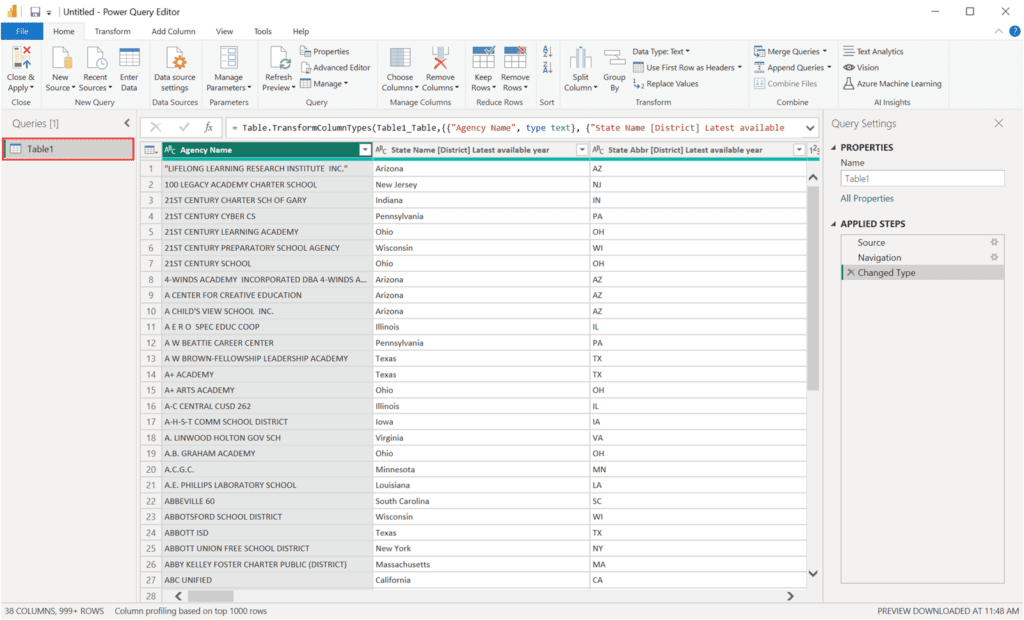
Power Query as a Data-Quality Control
In accounting and internal control work, we document review controls, approvals, and reconciliations in detail. But upstream of all that sits an uncomfortable reality:
Most reporting issues originate from poor data quality, not failed reviews.
PQ acts as a data-quality control layer:
-
Standardizing raw data before analysis
-
Enforcing structure before review
-
Reducing manual judgment during preparation
In practical terms, I use PQ to:
-
Normalize account and vendor names across systems
-
Flag missing or malformed identifiers
-
Remove duplicates before sampling
-
Align fiscal periods and reporting calendars
This isn’t analytics.
It’s control hygiene.
And hygiene is what allows downstream controls to actually work.
Use Cases: Where Power Query Fits in Real Work
Accounting
-
Monthly reconciliations
-
Trial balance consolidation
-
Vendor and customer master cleanup
-
MIS and management reporting preparation
Internal Controls
-
Population preparation for control testing
-
Exception flagging before review
-
Evidence consistency across periods
-
Reduction of spreadsheet-based control risk
Audit & Assurance
-
Sampling data preparation
-
Duplicate and completeness testing
-
Multi-entity or multi-system data alignment
-
Repeatable audit workpapers
Power Query does not replace professional judgment. It ensures judgment is applied to clean, structured inputs.
From One-Off Cleanup to Repeatable Process
Traditional Excel cleanup works once. PQ works every time.
You define transformation steps once:
-
Rename columns
-
Filter rows
-
Merge datasets
-
Apply validation rules
After that, new data simply flows through the same logic. For professionals handling monthly closes, quarterly controls testing, or recurring audits, this matters. You move from manual effort to defined process.
That transition mirrors what most frameworks expect:
– from person-dependent execution to process-dependent controls.
Power Query quietly enables that shift—inside Excel.
Where Power Query Fits in my Daily Work
In my own setups, Power Query usually sits between source systems and reporting artifacts.
Examples:
-
ERP exports → Power Query → Trial balance / working papers
-
Accounts payable listings → Power Query → Duplicate payment testing
- Critical backup logs → Power Query → List of missed backups
-
User access logs → Power Query → Control evidence samples
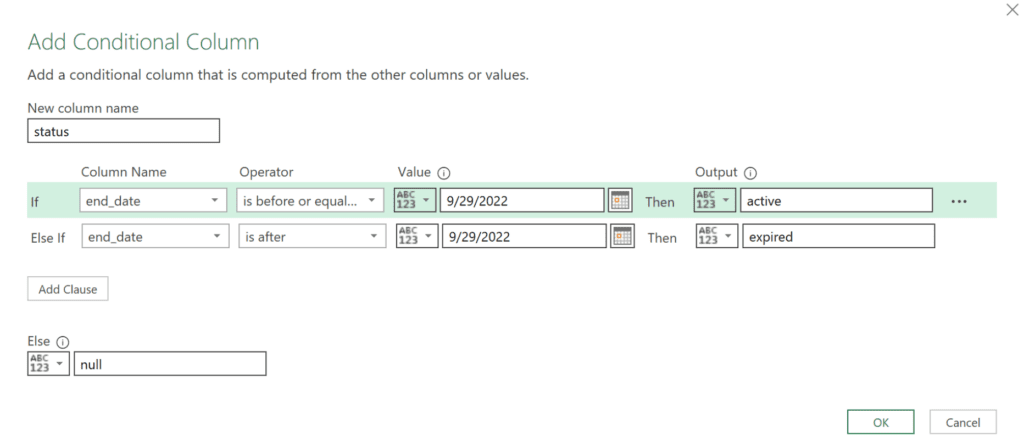
Control Thinking Without Heavy Tooling
Not every data or control problem needs Python, SQL, or a data warehouse.
Power Query occupies a useful middle ground:
-
More robust than formulas
-
Less fragile than macros
-
Easier to review than scripts
In spreadsheet-heavy control environments, Power Query makes Excel less risky and more defensible.
Each refresh follows the same steps. Each output can be reproduced. That alone strengthens spreadsheet controls.
What Broke When I Used It (and What Changed)
Early issues were predictable. Queries broke when:
-
Column headers changed
-
File paths were unstable
-
One query tried to do too much
The fixes were simple:
-
Standardize exports
-
Lock naming conventions
-
Split logic into smaller queries
Power Query rewards disciplined inputs. That’s not a limitation—it’s alignment with control thinking.
Closing Note
Power Query won’t turn you into a data engineer. It will make your data handling procedural instead of personal.
For accountants, that means fewer silent errors. For controls and audit professionals, it means cleaner populations, stronger evidence, and reduced spreadsheet risk.
It doesn’t demand attention. It just sits quietly between raw data and reported numbers—and does its job.
FAQs
Is PQ suitable for SOX-controlled environments, or is it just an Excel convenience tool?
PQ can fit well within SOX-controlled environments when used thoughtfully. Its strength lies in repeatable, visible transformation steps that reduce manual intervention. While it does not replace formal IT controls, it significantly lowers spreadsheet risk by standardising data preparation and improving traceability.
How does PQ reduce spreadsheet risk compared to traditional Excel formulas?
Traditional formulas rely heavily on manual copying and hidden cell logic. PQ centralises data preparation into explicit steps that run the same way every time. This reduces the risk of accidental overwrites, inconsistent logic, and undocumented changes—common spreadsheet control weaknesses.
Can PQ be reviewed or relied upon during audit or control testing?
Yes, when designed properly. The “Applied Steps” provide a clear, sequential view of how data was transformed. This makes preparation logic easier to understand, explain, and review compared to complex nested formulas spread across worksheets.
Where should PQ sit in an accounting or controls workflow?
PQ works best between source system exports and analytical or reporting outputs. It should be used to clean, standardise, and validate data before it feeds into reconciliations, control testing, or reporting layers.
Is PQ a replacement for SQL, Python, or BI tools in control work?
No. PQ is best viewed as a lightweight, accessible data preparation layer. It complements—not replaces—databases, scripts, or BI platforms, especially where Excel-based workflows are still unavoidable.
Resources
The resources at Microsoft are a good starting point – What is Power Query? & Power Query Documentation.